Using the Administrative Menu
Use the Admin menu to perform and customize a variety of system administrative functions.
- Validation engines management
- Estimation engines management
- Device data purging actions
- Device data thinning actions
- Report definitions management
- Administrative options configuration
|
Administrative Menu |
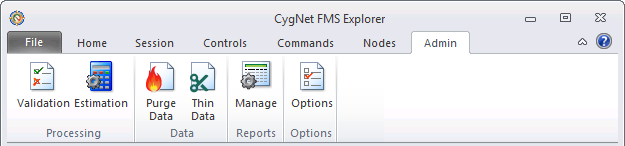
You must have proper security authorization to perform administrative actions. See FMS Security (and ACCESS security event) for information about configuring security access for the administrative menu.
Validation Processing
Validation engines and rules can be added, edited, and deleted. Access this functionality from the Administrative menu, via the Validation button. See Managing Validation Engines for configuration information.
The CygNet Measurement system can be configured to validate incoming data to ensure that analysts get as accurate a representation of the products flowing through a measurement device as possible. Since data coming from field devices or external systems may be of suspect or poor quality, incoming data can be optionally configured to go through an analysis process where records are validated against one or more custom configured validation rules to quickly identify problems in the data.
Multiple validation rules can be grouped together into validation engines with well-defined activation triggers. Within each engine, you can configure rules and their related parameters accordingly. If a device resolves to multiple validation rules or engines, all will be used.
When a record fails a validation rule, a related exception with a user-defined severity is generated, which can be viewed, sorted and edited on the Exceptions Control. There can be multiple exceptions for any given record. All raw data is validated, but user edits are optionally validated.

Estimation Processing
Estimation Engines can be added, edited, and deleted. Access this functionality from the Administrative menu, via the Estimation button. See Managing Estimation Engines for configuration information.
When configured by the system administrator, the CygNet Measurement system will find missing data, late data, and data of insufficient quality; and estimate a better value. Estimation is only performed at the station level. An estimated value is an edit of a record to improve its data quality, which provides users with the most accurate overall view possible at any given time.
Estimation is performed by an estimation engine, which defines what data will be estimated and how to perform the estimation. Missing data and low quality data is estimated as soon as the record enters the measurement system. Late data estimation must be initiated by the Estimate Station Data command.
Each estimation engine supports multiple estimation rules, so that different estimation handling routines can be performed in a user-defined order of precedence, given prescribed data constraints. For example, when estimating data, a higher-ranked estimation rule may not have available data (e.g. nominations are not being received). The system would then move to next defined estimation rule, and so on. Once data is estimated, the system will never do another estimation, even if more data becomes available.
Estimation can be configured on a group level (unique general group) and/or a station level. Therefore one engine can be defined and applied to a group, and hence indirectly to the multiple devices within that group. However, you can override the rules in the group-level engine by applying different rules to specific stations within the group. The system will try to resolve an estimation rule at the station level and if one isn't found, then check at the group level.
It is possible to configure a different data quality level for each estimation rule. In the case of invalid data, a maximum data quality can be configured so there is the potential for the measurement system to only generate estimates for the most invalid data.
Purging Device Data
Device Node data can be purged from the system to remove unnecessary records. This action can be taken for selected Nodes, from a specified beginning date/time until a specified ending date/time. Access this functionality from the Administrative menu, via the Purge button. See Purging Device Data for configuration information.
Thinning Device Data
Device Node data can be thinned to remove duplicate records from the system, while retaining master records. This action can be taken for selected Nodes, from a specified beginning date/time until a specified ending date/time. Access this functionality from the Administrative menu, via the Thin button. See Thinning Device Data for configuration information.
Managing Reports
FMS report definitions can be created and managed to best customize them for your system and business goals. Access this functionality from the Administrative menu, via the Manage button. See Managing Report Definitions for configuration information.
Configuring Options
Several configuration options can be customized in order to process and display data most usefully in your system. Access this functionality from the Administration menu, via the Options button. See Configuring Administrative Options for configuration information.
For more information about a specific administrative option, see one of the following configuration topics.
- Audit Categories
- Composition Splits
- Custom Dashboard Columns
- Custom Device Data
- Data Quality Settings
- Email Options
- Normalization Views
- System Options
- Unit Set Definitions
More:
 Configuring Administrative Options

